

✅ What a DOT Card Lets You Include
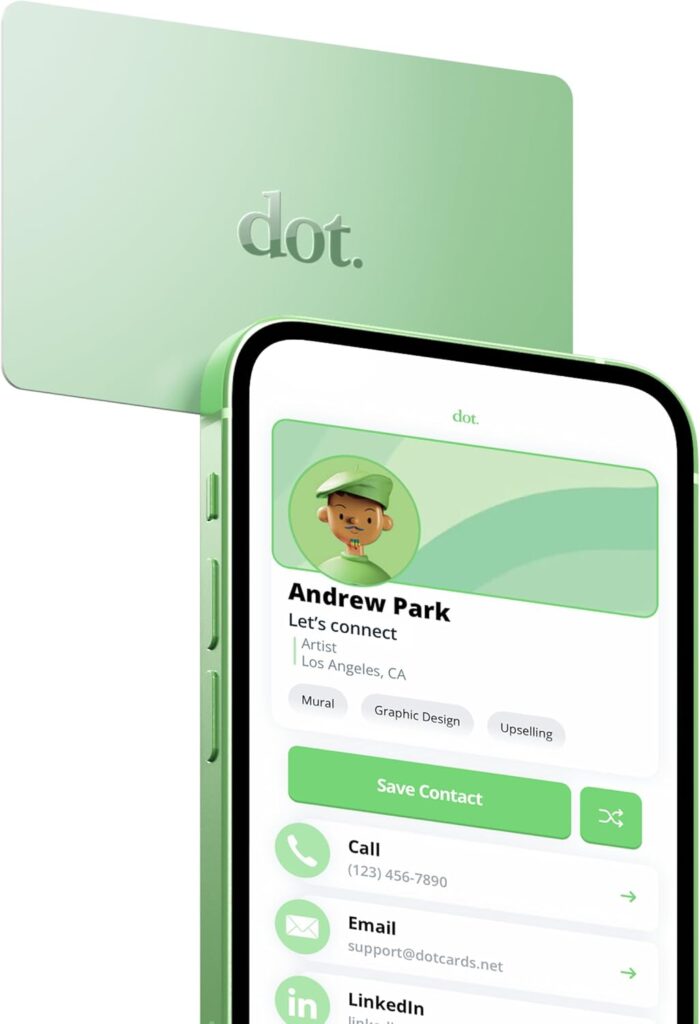
- When someone taps the DOT Card, it opens a web-based profile (your “dot.Profile”) on their phone.
- In that profile, you can store: name, phone number, email address, job title/role, company name — basically all the standard business-card info.
- On top of basic info, you can also include a variety of links: social media profiles (Instagram, TikTok, LinkedIn, etc.), websites, online stores, booking links, payment links (depending on what card supports), and any custom URL you want.
- The profile is editable — you can update the info any time, and every card linked to that profile will show the updated data instantly.
- There’s no hard “character limit” like a paper card — because you’re storing a URL to a web page, the amount of info is more limited by how much you want to include on that webpage than by the card itself. Many providers describe the card as capable of including “all of your contact info, socials, payment info, and more.”
In short: a DOT Card is more like a gateway to a rich online profile — not just a static name/phone — so you can embed as much digital info as you like (within reason) — far more than a classic paper business card.
🎯 What This Means In Practice (Why It’s Powerful)
- Unlimited links & types: You’re not limited to 3–4 items (name, phone, company, email). You can add multiple social accounts, site links, store links, booking links, payment links, etc.
- Dynamic & updatable: If you change phone numbers, email, website, socials — you don’t need to print new cards. You just update your dot.Profile and everyone tapping your card sees the new info.
- Richer presentation: You can use your digital profile to show more than just contact info — maybe a small bio, a portfolio, links to work, services list, even online store or booking links.
- Less clutter, no limit: Because it’s digital, you avoid cluttering a small card with tiny text. You can add more content in a clean, easy-to-view format on a phone screen.
⚠️ What to Keep in Mind / Potential Limits
- The card itself doesn’t store huge data — it points to a web profile. So if the hosting service goes down, the link may fail.
- The “profile webpage” layout matters: if you cram too many links or info, it can get messy or overwhelming. Best practice: only include what’s relevant.
- You rely on the recipient having a smartphone (almost universal today) and internet/browser to view your profile.
- Because the profile is loaded online, sharing sensitive data (like home address, sensitive personal info) may not be wise. Treat the card as a professional contact tool — same as a regular business card.
🎯 My Take: What’s Ideal to Put on a DOT Card
Because of its flexibility, I recommend using the DOT Card for:
- ✅ Name, Title, Company
- ✅ Phone number, Email
- ✅ Website / Portfolio link
- ✅ Social media profiles (TikTok, Instagram, LinkedIn, etc.)
- ✅ Booking links or online store links (if you sell something or take appointments)
- ✅ Payment / Contact-less payment links (if supported)
- ✅ A short bio or service description (if relevant)
✅ Real-world Examples / Services With Public/Shared Profiles
• The official dot.cards “Profile” features page
- Their product page clearly states that your dot.Profile supports “unlimited link content,” “contact info, social links, payment/productivity links, custom link titles,” etc.
- You can include: contact info, social media, website/portfolio links, payment/booking links, logos, custom design themes, and more.
- The profile is live via a single tap or QR scan — no app needed — which means any phone user can view/save your full profile.
• Similar platforms changing traditional business cards into digital NFC profiles
They highlight benefits like:
- Always up-to-date info (changeable without reprinting)
- Instant sharing with tap or QR code on any phone
- Ability to embed as many links/content as you want: portfolio, socials, websites, etc.
👉 Using a DOT-style card tied to something like infoDot.io demonstrates the “maximum potential” of what a digital business card can carry.
• Real-user comparisons and reviews (blog / articles) of Digital Business Cards
An article on the benefits of digital business cards (vs paper) explains that digital business cards allow creators or freelancers to showcase actual work (images, samples, portfolio, links) — not just basic contact info.
Use cases mentioned include: artists showing sample work, writers/linking to writing samples, freelancers linking to full portfolios or service pages, and more.
👉 These show that many users treat their digital business card as a “mini portfolio + contact hub,” which proves the flexibility and capacity of the format.
Based on these real examples, a “fully optimized” DOT or similar digital card profile often includes:
Because the profile is a webpage, there’s effectively no strict “character limit.” What limits you is design clarity — how much you put without overwhelming a first-time viewer.
🎯 Why These Public Examples Matter for You
- They prove that digital cards aren’t just minimal contact placeholders — they’re flexible mini-websites.
- You can treat your DOT card profile as a living online presence — update anytime, add links, change info without reprinting.
- You can tailor the profile to your business: for example, if you sell products, you can include store links; if you do services, booking/payment links; if you create content — social & portfolio links.
- They make networking dynamic — you’re not handing out a tiny paper card but a full digital “first impression” profile that’s easy to save & revisit.
⚠️ What to Keep in Mind
- Because the card links to a web-based profile, internet access and a smartphone are required — which is usually fine today, but worth noting if someone has no data or a very old phone.
- If you overload the profile with too many links or too much content, it can get messy — so design clarity and good organization is key (arrange links, use categories, only include what matters).
Overall Rating
★ ★ ★ ★ ☆ (4.7 / 5)
- Pros: Instant sharing, unlimited updates, professional branding
- Metal card for durability
- Cons: Requires phone/internet to view
- Potential contact may be hesitant for the “tap”
Reliable, easy to use, and far more convenient than traditional business cards.
A must-have for creators, networkers, and small business owners looking to share info instantly.
Delivers more functionality per dollar than any printed business card ever could.
One of the best modern tools for networking and creator branding.
DOT leads in ease of use, tap reliability, and link customization.
Grab a DOT card and start networking with a tap
As an Amazon Associate, antfueled.com earns from qualifying purchases. This does not affect the price you pay